Как сделать фото в стиле Gorillaz: 4 AI-промпта под свою фотографию
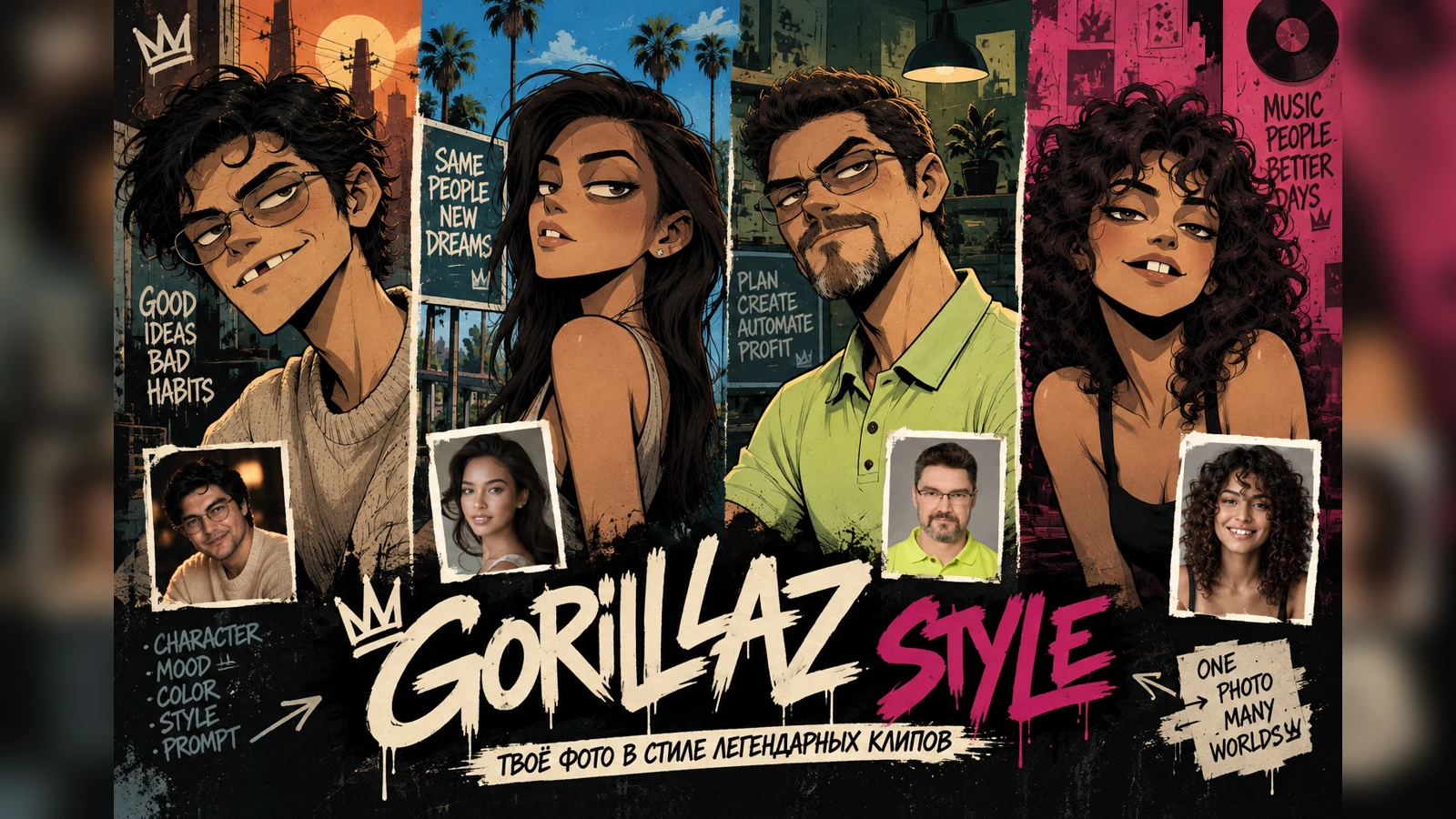
Четыре разных сцены для одного подхода: тёплая крыша, солнечный город, креативная студия и красная музыкальная комната. У каждого результата — отдельный промпт, negative prompt и правило, как подстроить фон под одежду на вашей фотографии.
Anvar
Один и тот же приём легко превращается в четыре совсем разных постера: тёплая крыша, солнечный город, креативная студия или красная музыкальная комната. Ниже — четыре отдельных AI-промпта для фото в стиле Gorillaz: каждый сохраняет человека и его одежду, но строит окружение под палитру исходного снимка.
Что загружатьОдну фотографию человека с хорошо читаемым лицом и одеждой.
Что меняетсяОкружение, цветовая атмосфера, детали сцены и настроение.
Что сохраняетсяУзнаваемость лица, причёска, очки/борода при наличии и реальная одежда.
Почему один общий промпт здесь хуже четырёх отдельных
Запрос «сделай меня в стиле Gorillaz» слишком широкий: генератор сам решает, какой должна быть форма головы, насколько сильно менять лицо, каким сделать фон и даже где расположить характерную щель между зубами. Поэтому в этой статье я разделил задачу на четыре самостоятельных сценария. У каждого свой фон и цветовая логика, но один принцип сохранения человека.
В поисковой выдаче по этой теме повторяются формулировки «фото в стиле Gorillaz», «персонаж в стиле Gorillaz», «портрет в стиле Gorillaz» и «иллюстрация в стиле Gorillaz». Поэтому материал построен не как короткая карточка с одним prompt, а как практический разбор: выберите результат, который ближе к вашему исходному фото, и копируйте именно его промпт.
Что делает персонажа похожим на визуальный язык клипов
Необычная форма головы: слегка увеличенный округлый верх, более короткая нижняя часть лица, узкая или угловатая челюсть.
Глаза и брови: тяжёлые верхние веки, крупные светлые глаза, маленькие смещённые зрачки и сильные брови.
Рот и зубы: асимметричная улыбка, отдельные неровные зубы и заметная тёмная щель. Она может быть сбоку — не надо автоматически ставить её строго по центру.
Волосы: сильный графичный силуэт, чёлка или forelock только если это соответствует исходной причёске.
Линия: неровный чёрный контур, cel shading, плоские цветовые блоки, потертая бумага и печатная фактура.
При этом лучше не копировать конкретного существующего героя группы. Задача — сделать оригинального персонажа по своей фотографии с узнаваемым визуальным языком.
1. Тёплая городская сцена — для бежевой и тёплой одежды
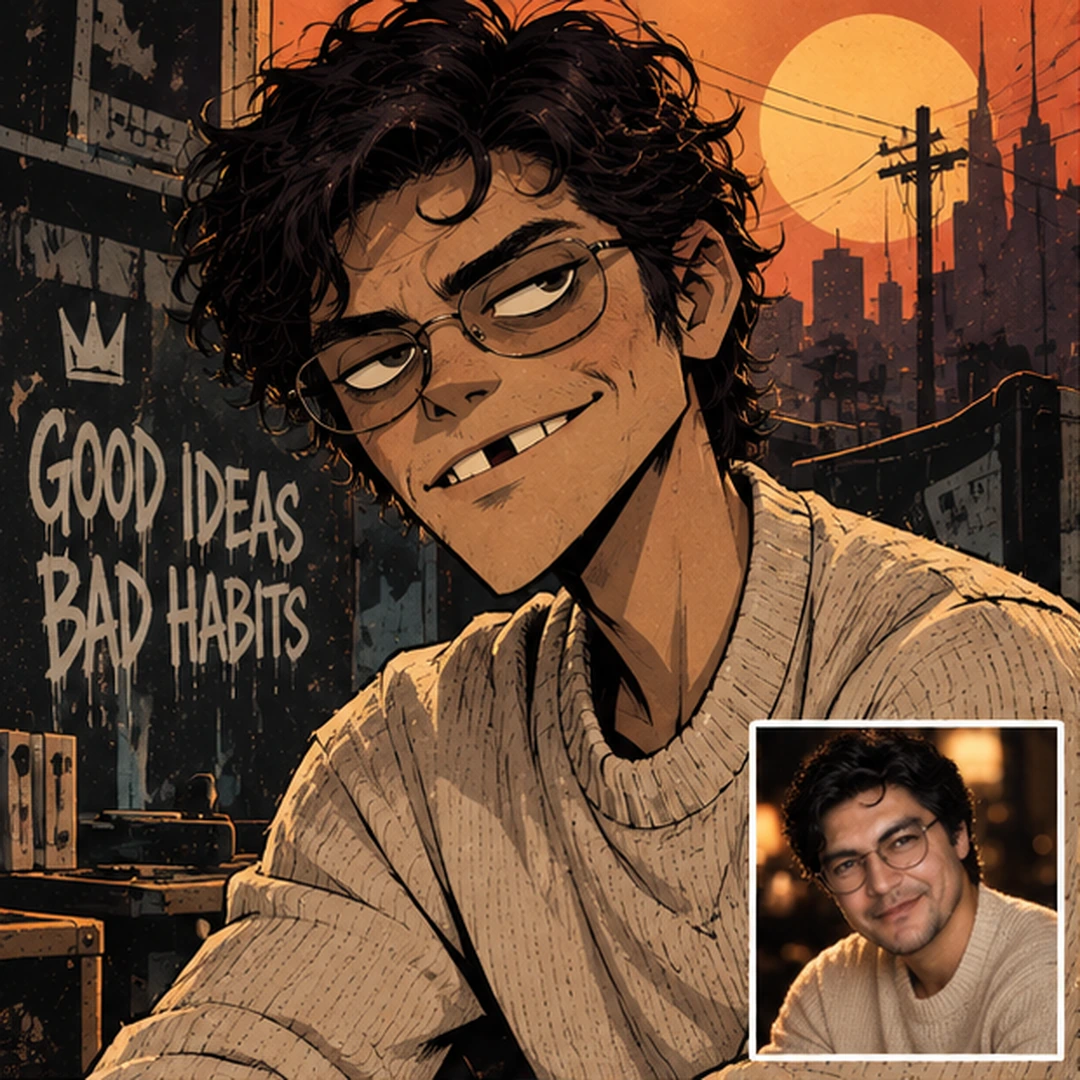
Первый вариант строит окружение вокруг тёплой палитры одежды: янтарный свет, крыша, музыкальная комната, гитара и городской закат. Это хороший выбор, если исходная одежда уже бежевого, коричневого, кремового или другого тёплого оттенка.
Первый вариант строит окружение вокруг тёплой палитры одежды: янтарный свет, крыша, музыкальная комната, гитара и городской закат. Это хороший выбор, если исходная одежда уже бежевого, коричневого, кремового или другого тёплого оттенка.
Тёплая городская сценаPrompt
Use the uploaded portrait photo as the ONLY identity and clothing reference for the main subject.
Preserve the recognizable person: face shape, jawline, chin, cheekbones, nose, lips, eye shape and spacing, eyebrows, skin tone, facial hair if present, hairstyle, hairline, ears, glasses if present, and the visible outfit.
Do not beautify, idealize, age-shift, gender-swap, or invent new facial features.

Create an ORIGINAL alternative-comic character illustration inspired by the graphic animated visual language commonly associated with Gorillaz, but do NOT recreate any existing Gorillaz character.

CHARACTER LANGUAGE
- slightly oversized and unusual head silhouette
- rounded cranium with a shorter, flatter lower face
- narrow or angular jaw adapted to the reference
- long thin neck and simplified graphic anatomy
- bold irregular black outlines with varied line weight
- heavy upper eyelids and strong brows
- pale expressive eyes with small off-center pupils
- stylized nose and mouth while preserving the person's identity
- asymmetrical expression, relaxed or slightly mischievous
- if teeth are visible: individually drawn imperfect rectangular teeth with one noticeable dark gap that may sit OFF-CENTER, never force the gap exactly in the middle
- keep a messy fringe / forelock only if compatible with the person's real hairstyle; stylize the real hair rather than replacing it
- flat color blocks, cel shading, high-contrast graphic shadows, distressed paper and print texture
- no photorealism, no glossy 3D, no anime, no chibi

REFERENCE CARD
In the lower-right corner, place the ORIGINAL uploaded photo as a small clean reference card with a simple WHITE BORDER.
Do not repaint or stylize the inset reference photo.
The inset must be clearly smaller than the illustrated character and must never cover the face.

SCENE 1 — WARM ROOFTOP MUSIC ROOM
Build a warm urban rooftop / rehearsal-room environment at sunset.
Use amber, burnt orange, charcoal, dusty beige and dark brown, but derive the exact accent balance from the colors already present in the subject's clothing.
Include a few believable music-space details: guitar, amplifier, worn posters, power lines, distant skyline, desk lamp, records or sketchbooks.
The environment should feel lived-in, creative and slightly rough, not like a generic cyberpunk scene.
Keep the subject dominant in frame, medium close-up, eye-level camera.
The pose can be relaxed, slightly leaning toward camera.
Optional handwritten micro-text can be sparse and decorative only; avoid large paragraphs of generated text.
Aspect ratio: 4:5 portrait.
Негативный промпт — открыть
photorealistic face, glossy 3D render, Pixar, Disney, anime, manga, chibi, exact existing Gorillaz character, copied band member, generic perfect face, perfect symmetrical smile, perfectly centered tooth gap, porcelain skin, bodybuilder anatomy, huge muscles, wrong glasses, missing glasses when present in reference, changed outfit, duplicate person, second main face, extra hands, deformed fingers, random readable paragraphs, watermark, logo imitation, low detail
Что здесь можно менять
Окружение: заменяйте только блок SCENE, если хотите сравнить один и тот же образ в другой среде.
Палитру: не задавайте случайный цвет — сначала привяжите её к одежде на исходном фото.
Выражение: можно сделать героя спокойнее, ироничнее или увереннее, не меняя идентичность.
Зубы: если рот открыт, оставляйте неровность естественной; характерная щель не обязана быть строго по центру.
2. Солнечный город с пальмами — для светлой нейтральной палитры
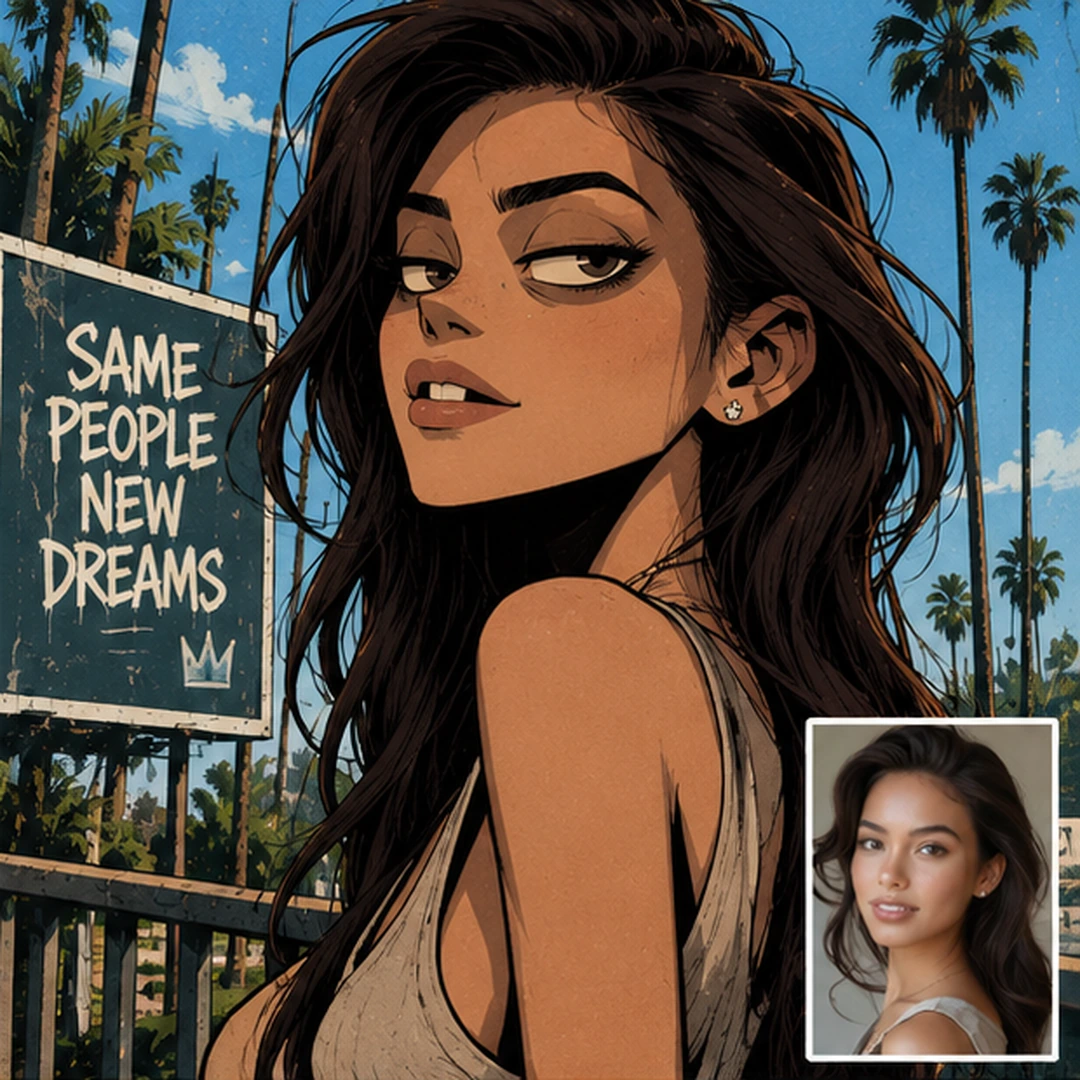
Здесь персонаж остаётся главным, а фон становится легче: пальмы, голубое небо, архитектура и светлый воздух. Цвет окружения не выбирается отдельно — он сначала подстраивается под одежду на загруженной фотографии.
Здесь персонаж остаётся главным, а фон становится легче: пальмы, голубое небо, архитектура и светлый воздух. Цвет окружения не выбирается отдельно — он сначала подстраивается под одежду на загруженной фотографии.
Солнечный город с пальмамиPrompt
Use the uploaded portrait photo as the ONLY identity and clothing reference for the main subject.
Preserve the recognizable person: face shape, jawline, chin, cheekbones, nose, lips, eye shape and spacing, eyebrows, skin tone, facial hair if present, hairstyle, hairline, ears, glasses if present, and the visible outfit.
Do not beautify, idealize, age-shift, gender-swap, or invent new facial features.

Create an ORIGINAL alternative-comic character illustration inspired by the graphic animated visual language commonly associated with Gorillaz, but do NOT recreate any existing Gorillaz character.

CHARACTER LANGUAGE
- slightly oversized and unusual head silhouette
- rounded cranium with a shorter, flatter lower face
- narrow or angular jaw adapted to the reference
- long thin neck and simplified graphic anatomy
- bold irregular black outlines with varied line weight
- heavy upper eyelids and strong brows
- pale expressive eyes with small off-center pupils
- stylized nose and mouth while preserving the person's identity
- asymmetrical expression, relaxed or slightly mischievous
- if teeth are visible: individually drawn imperfect rectangular teeth with one noticeable dark gap that may sit OFF-CENTER, never force the gap exactly in the middle
- keep a messy fringe / forelock only if compatible with the person's real hairstyle; stylize the real hair rather than replacing it
- flat color blocks, cel shading, high-contrast graphic shadows, distressed paper and print texture
- no photorealism, no glossy 3D, no anime, no chibi

REFERENCE CARD
In the lower-right corner, place the ORIGINAL uploaded photo as a small clean reference card with a simple WHITE BORDER.
Do not repaint or stylize the inset reference photo.
The inset must be clearly smaller than the illustrated character and must never cover the face.

SCENE 2 — SUNNY PALM CITY
Build an airy urban-coastal background with palm trees, blue sky, sunlit walls, rooftop rails and a distant city silhouette.
The palette must be sampled from the subject's outfit first: use those clothing colors as the anchor, then add complementary sky / foliage / architecture colors around them.
Keep the atmosphere bright, graphic and stylish rather than tropical-tourist.
Use a confident three-quarter portrait pose with a slightly raised chin.
Let the hair silhouette and face remain highly readable against the background.
Keep the character design angular and animated, with an off-center imperfect tooth gap only if teeth are naturally visible.
Original photo reference card stays in the LOWER-RIGHT corner with a clean white border.
Aspect ratio: 4:5 portrait.
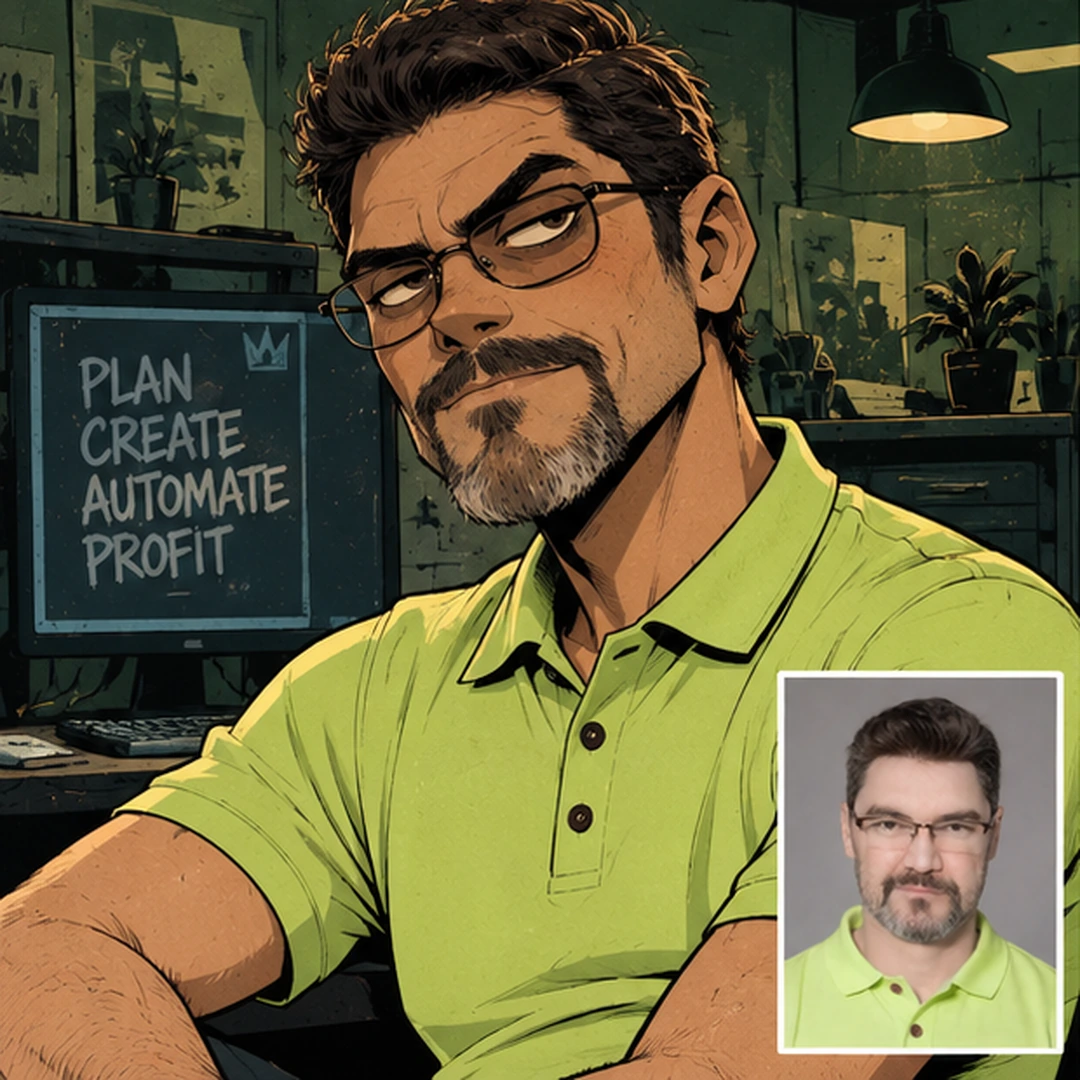
Если на исходном фото есть сильный цвет, его можно перенести в окружение. В этом варианте зелёная одежда становится акцентом студии: цвет появляется в свете, стенах и мелких деталях, но не превращает весь кадр в одно зелёное пятно.
Если на исходном фото есть сильный цвет, его можно перенести в окружение. В этом варианте зелёная одежда становится акцентом студии: цвет появляется в свете, стенах и мелких деталях, но не превращает весь кадр в одно зелёное пятно.
Креативная студия под цвет одеждыPrompt
Use the uploaded portrait photo as the ONLY identity and clothing reference for the main subject.
Preserve the recognizable person: face shape, jawline, chin, cheekbones, nose, lips, eye shape and spacing, eyebrows, skin tone, facial hair if present, hairstyle, hairline, ears, glasses if present, and the visible outfit.
Do not beautify, idealize, age-shift, gender-swap, or invent new facial features.

Create an ORIGINAL alternative-comic character illustration inspired by the graphic animated visual language commonly associated with Gorillaz, but do NOT recreate any existing Gorillaz character.

CHARACTER LANGUAGE
- slightly oversized and unusual head silhouette
- rounded cranium with a shorter, flatter lower face
- narrow or angular jaw adapted to the reference
- long thin neck and simplified graphic anatomy
- bold irregular black outlines with varied line weight
- heavy upper eyelids and strong brows
- pale expressive eyes with small off-center pupils
- stylized nose and mouth while preserving the person's identity
- asymmetrical expression, relaxed or slightly mischievous
- if teeth are visible: individually drawn imperfect rectangular teeth with one noticeable dark gap that may sit OFF-CENTER, never force the gap exactly in the middle
- keep a messy fringe / forelock only if compatible with the person's real hairstyle; stylize the real hair rather than replacing it
- flat color blocks, cel shading, high-contrast graphic shadows, distressed paper and print texture
- no photorealism, no glossy 3D, no anime, no chibi

REFERENCE CARD
In the lower-right corner, place the ORIGINAL uploaded photo as a small clean reference card with a simple WHITE BORDER.
Do not repaint or stylize the inset reference photo.
The inset must be clearly smaller than the illustrated character and must never cover the face.

SCENE 3 — CREATIVE WORKSPACE / TECH STUDIO
Build a moody creative workspace with monitors, sketches, shelves, a desk lamp, notebooks, speakers and subtle city shapes outside.
Use the dominant clothing color as the primary accent of the environment. If the outfit contains a vivid green, lime, blue or another strong hue, repeat it selectively in practical lights, wall graphics or small objects while keeping the rest charcoal, muted teal and warm neutrals.
Make the subject look calm, experienced and self-possessed.
Use a seated or half-body portrait, slightly off-center composition, strong silhouette.
If facial hair or glasses exist in the uploaded photo, keep them recognizable in the stylized version.
If teeth are visible, keep them imperfect and asymmetric; one gap may be off-center.
Original reference photo remains in the LOWER-RIGHT corner inside a simple white frame.
Aspect ratio: 4:5 portrait.
Окружение: заменяйте только блок SCENE, если хотите сравнить один и тот же образ в другой среде.
Палитру: не задавайте случайный цвет — сначала привяжите её к одежде на исходном фото.
Выражение: можно сделать героя спокойнее, ироничнее или увереннее, не меняя идентичность.
Зубы: если рот открыт, оставляйте неровность естественной; характерная щель не обязана быть строго по центру.
4. Красная музыкальная студия — для чёрной или тёмной одежды
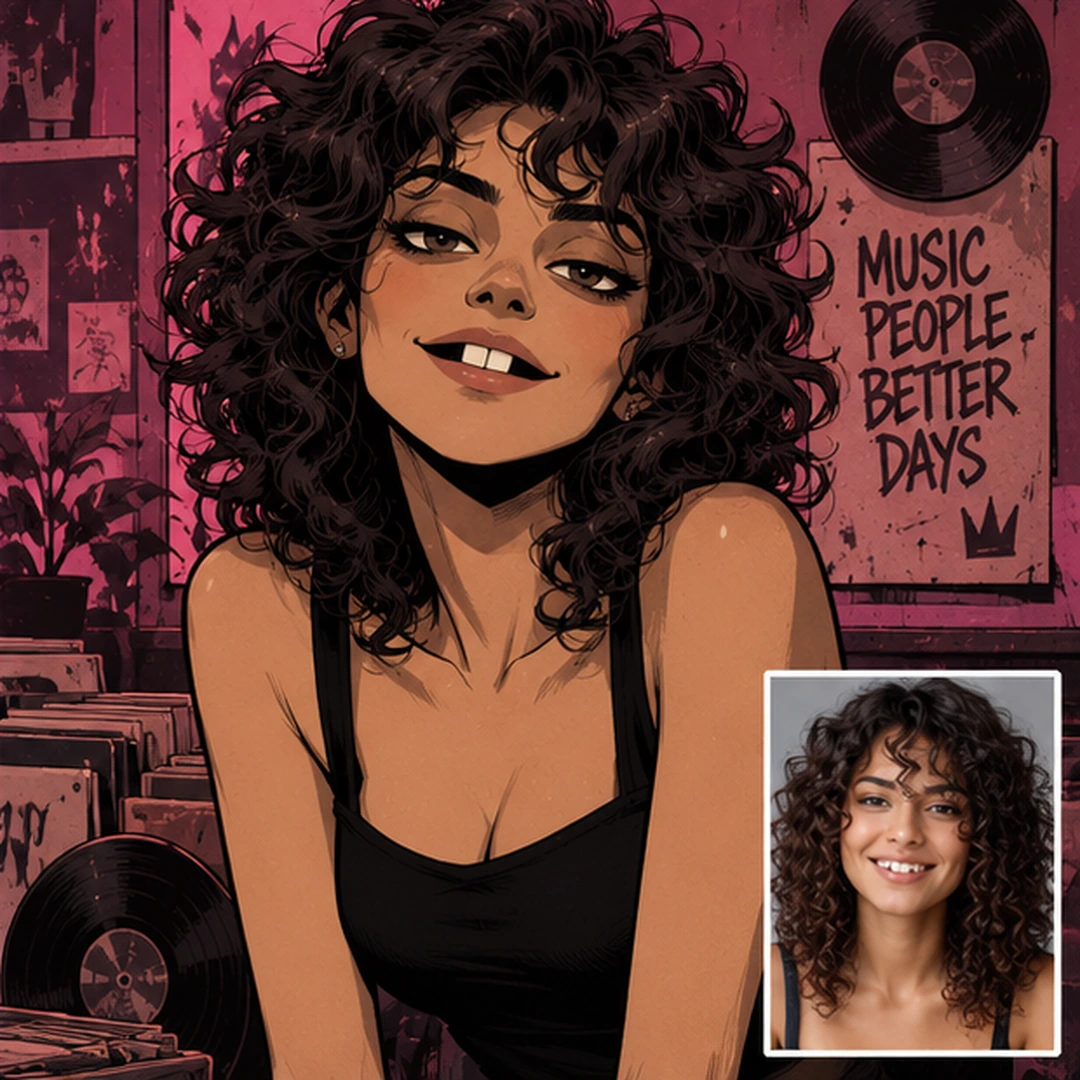
Тёмная одежда хорошо работает с красным и magenta-окружением. Здесь фон более музыкальный и контрастный: винил, плакаты, гитара и тёмная студия. Важно, чтобы красный оставался окружением, а не перекрашивал кожу или одежду.
Тёмная одежда хорошо работает с красным и magenta-окружением. Здесь фон более музыкальный и контрастный: винил, плакаты, гитара и тёмная студия. Важно, чтобы красный оставался окружением, а не перекрашивал кожу или одежду.
Красная музыкальная студияPrompt
Use the uploaded portrait photo as the ONLY identity and clothing reference for the main subject.
Preserve the recognizable person: face shape, jawline, chin, cheekbones, nose, lips, eye shape and spacing, eyebrows, skin tone, facial hair if present, hairstyle, hairline, ears, glasses if present, and the visible outfit.
Do not beautify, idealize, age-shift, gender-swap, or invent new facial features.

Create an ORIGINAL alternative-comic character illustration inspired by the graphic animated visual language commonly associated with Gorillaz, but do NOT recreate any existing Gorillaz character.

CHARACTER LANGUAGE
- slightly oversized and unusual head silhouette
- rounded cranium with a shorter, flatter lower face
- narrow or angular jaw adapted to the reference
- long thin neck and simplified graphic anatomy
- bold irregular black outlines with varied line weight
- heavy upper eyelids and strong brows
- pale expressive eyes with small off-center pupils
- stylized nose and mouth while preserving the person's identity
- asymmetrical expression, relaxed or slightly mischievous
- if teeth are visible: individually drawn imperfect rectangular teeth with one noticeable dark gap that may sit OFF-CENTER, never force the gap exactly in the middle
- keep a messy fringe / forelock only if compatible with the person's real hairstyle; stylize the real hair rather than replacing it
- flat color blocks, cel shading, high-contrast graphic shadows, distressed paper and print texture
- no photorealism, no glossy 3D, no anime, no chibi

REFERENCE CARD
In the lower-right corner, place the ORIGINAL uploaded photo as a small clean reference card with a simple WHITE BORDER.
Do not repaint or stylize the inset reference photo.
The inset must be clearly smaller than the illustrated character and must never cover the face.

SCENE 4 — RED / MAGENTA RECORD ROOM
Build an intimate music room or record-store studio with vinyl records, speakers, posters, a guitar, worn walls and layered paper textures.
Drive the environment palette from the outfit: for a dark or black outfit, use deep black as the base and add controlled red, magenta, crimson or dusty rose accents so the character separates from the background.
Use a lively, charismatic portrait pose with a relaxed shoulder angle and direct attitude.
Keep the head silhouette slightly exaggerated and graphic; preserve the real hairstyle but push the curls / fringe into strong readable shapes.
If the mouth is open, show individually drawn imperfect teeth; the characteristic gap may sit to one side and must NOT always be centered.
Put the untouched original photo in the LOWER-RIGHT corner inside a clean white border.
Aspect ratio: 4:5 portrait.
Негативный промпт — открыть
photorealism, airbrushed beauty photo, glossy 3D, anime, manga, chibi, exact existing Gorillaz character, copied band member, overly cute face, perfect veneers, centered tooth gap, identical teeth, plastic skin, wrong hair texture, different person, changed outfit, nightclub neon overload, duplicate subject, extra limbs, random logos, watermark, illegible text clutter
Что здесь можно менять
Окружение: заменяйте только блок SCENE, если хотите сравнить один и тот же образ в другой среде.
Палитру: не задавайте случайный цвет — сначала привяжите её к одежде на исходном фото.
Выражение: можно сделать героя спокойнее, ироничнее или увереннее, не меняя идентичность.
Зубы: если рот открыт, оставляйте неровность естественной; характерная щель не обязана быть строго по центру.
Как применять эти промпты к своей фотографии
Загрузите одно исходное фото. Чем лучше видны лицо, волосы, очки или борода и верх одежды, тем легче сохранить человека.
Выберите один из четырёх сценариев. Не смешивайте сразу rooftop, palms, workspace и record room.
Сначала ничего не меняйте. Получите первый результат и сравните лицо, причёску, одежду и силуэт.
Потом меняйте одну вещь. Например, только фон, только время суток или только выражение лица.
Если лицо «уплыло». Усильте первые строки про identity preservation, а стилистические слова оставьте ниже.
Как менять окружение под одежду, а не наоборот
Самый простой принцип: одежда — это якорь. Сначала модель должна увидеть её цвет и материал, а уже потом из этой палитры строить фон. Бежевая одежда хорошо переносится в тёплый amber/charcoal, яркий зелёный можно повторить в небольших акцентах студии, чёрный — поддержать crimson/magenta, а светлые нейтральные оттенки — воздухом, небом и более спокойной архитектурой.
Если сначала приказать «сделай красный фон», модель может начать красить в красный всё подряд. Поэтому формулировка derive the environment palette from the subject's clothing полезнее, чем просто название цвета.
Типичные ошибки
Слишком красивое «идеальное» лицо — пропадает характер и узнаваемость.
Одинаковая щель между зубами строго по центру у всех персонажей — выглядит шаблонно.
Новый случайный hairstyle вместо стилизации реальной причёски.
Слишком много надписей на фоне — генератор начинает выдавать бессмысленный текст.
Фон не связан с одеждой — персонаж выглядит наклеенным поверх другой картинки.
Попытка одновременно изменить лицо, одежду, фон, позу и цвет — трудно понять, что именно сломало результат.
Итог
Для фото в стиле Gorillaz сильнее работает не один огромный универсальный prompt, а несколько конкретных сценариев. Сначала фиксируем человека и его одежду, затем выбираем окружение и только после этого меняем отдельные параметры. Так проще получить управляемый результат и понять, какая часть текста действительно влияет на генерацию.